

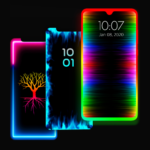
The Edge Lighting – Borderlight app allows users to enhance their mobile device’s home and lock screens with customizable, curved edge lighting. Users can set these colorful round borders as live wallpapers, adjusting elements like color, width, and animation speed to suit their preferences. A key feature of the app is its ability to display this edge lighting over other applications, ensuring a consistent visual experience across the device’s interface.
Customizing Edge Lighting Appearance
The app provides a range of settings to tailor the edge lighting effect. Users can change the colors of the EDGE borders, adjust their width, and modify the animation speed. Further customization includes setting the bottom and top curve radius. For devices with notches, the app supports adjusting the Display Notch’s width, height, and its top and bottom radius to integrate the lighting seamlessly. There are over 15 distinct border types available, such as Heart, Bird, Sun, Lotus, and Christmas Tree, allowing for varied visual themes.
Wallpaper and Background Integration
Beyond the lighting effects, Edge Lighting – Borderlight allows for background customization. Users can set 4K backgrounds directly within the app to appear behind the EDGE Lighting. Additionally, the app supports using personal photos from a user’s gallery as the wallpaper displayed between the edge lighting screen, offering a personalized backdrop for the dynamic borders. Recent updates have specifically addressed and improved the functionality for choosing images from the gallery.
Magical Edge Lighting Effects
For users seeking more elaborate designs, the app includes a Magical EDGE Lighting feature, offering more than 30 distinct types for both the home and lock screens. These include options like Colorful RGB Edge Lightning, Round Light RGB, and Magical RGB EDGE Lightning that can display in 2, 3, or 4 colors. These magical effects can be applied with a single click, providing a quick way to change the screen’s aesthetic.







Write a review